MyRXNT
- 4.6
- Rating
- 50.00K
- Installs
- Free
- Price
 Analysis by App-foxy
Managing healthcare information is rarely difficult because of one complicated task. The real problem is the scattered routine around it: checking a message, remembering an appointment detail, finding a prescription-related update, and trying to keep everything in one place. MyRXNT is designed to make that routine more manageable by keeping a connection to your care on a mobile device. After spending time with it, I see it as a practical medical app for people whose healthcare provider already uses the RXNT system, rather than a general health tracker that works independently.
The app is free, rated for Everyone, and developed by RXNT. It has built a solid audience on Android, with more than fifty thousand installs, a 4.6 average from roughly eight hundred ratings, and over two hundred written reviews. Those figures suggest that many users find its basic purpose useful, but they do not make it a universal replacement for every healthcare tool. Its value depends heavily on whether your provider’s workflow is connected to it and whether you want a focused patient portal instead of a broad wellness dashboard.
How MyRXNT fits into an everyday healthcare routine
I’d start by treating MyRXNT as one part of your care routine, not as a place to solve every healthcare task. The useful check is whether it makes the next step clearer: reviewing what is available, deciding whether you need to follow up, or preparing for a conversation with your provider. That practical expectation also helps separate app-related friction from issues that belong to the wider care process.
You May Also Like

 Blood Strike: 2.5 Anniversary
Blood Strike’s Loadouts Turn Every Drop Into a Tactical Gamble
A close look at Blood Strike’s custom loadouts: how fast access to signature weapons reshapes its battle royale rhythm, rewards preparation, and narrows the gap between fights.

 Pandora - Music & Podcasts
Pandora’s Music Is Easy to Start, but Harder to Recover
Pandora’s strength is its low-effort path from a seed to a station. Its weak spot is how much confidence it asks you to place in connection, setup, and quiet recovery.

 8 Ball Pool
 Is Built on Rivalries, Rematches, and Routine
A close look at the rivalries, rematches, shared routines, and unanswered safety questions that turn a quick pool match into a persistent mobile community.

 Samsung Music
’s Quiet Strength Is Playing What You Already Own
Its reach comes less from spectacle than from dependable access to a personal library. That simplicity is both the app’s strongest retention engine and its ceiling.

 AccuWeather: Weather Radar
AccuWeather Review: A Quick, Clear Forecast for Everyday Decisions
For everyday plans, the best forecast is the one you can understand quickly. AccuWeather makes rain timing, radar, and local conditions easy to act on, with a few trade-offs.

 Hill Climb Racing
Why Hill Climb Racing Still Turns Crashes Into One More Run
A tiny car, a bumpy hill and one more upgrade: Hill Climb Racing keeps resurfacing because its simple chaos makes every near-miss feel personal.
More From Our News Desk
View All News


The baseline workflow is deliberately simple
My first impression is that the app makes the most sense when treated as a doorway into an existing care relationship. You open it when you need to review something connected with your provider, rather than browsing it casually like a fitness or symptom-tracking app. That distinction matters. It keeps the experience focused, but it also means the app cannot create useful medical information by itself.
A realistic use case is a weekday morning before work. You remember that you need to check a care-related message or confirm what happened during a recent interaction with your provider. Instead of searching through email, paper notes, or a browser bookmark, you open MyRXNT and use the patient-facing workflow available through your connected account. Once finished, you can close it without being pulled into unrelated health content.
I appreciate that focused approach. Many medical apps try to combine appointments, articles, exercise, medication reminders, symptom journals, and insurance tools in one crowded interface. MyRXNT is easier to understand when you think of it as a direct connection to care. That makes it especially suitable for someone who wants fewer places to check and does not need a large collection of self-management features.
The first practical step is to confirm that the provider you use supports the RXNT environment. This is the most important decision before relying on the app. If your clinic is not part of that workflow, installing it may not solve the problem you actually have. In that situation, a provider-specific portal, a hospital network app, or a standard browser-based patient account may be more useful.
For a supported patient, the routine is easier to repeat. I would use the app at a few predictable moments: after a visit, when expecting a response from the care team, or when preparing for the next interaction. The benefit is not that every healthcare task becomes instant. The benefit is that the app gives those tasks a consistent starting point.
What to check before making it your main portal
I would not judge MyRXNT after only opening the first screen. Medical apps often depend on account status, provider configuration, and the information your care organization chooses to make available. A clean interface is helpful, but the real question is whether the app exposes the parts of your care routine you actually need.
Start by identifying your most frequent task. If you mainly need to stay connected with your provider, the app may fit naturally. If your priority is logging blood pressure, counting calories, tracking sleep, or recording symptoms without provider involvement, it is probably not the right primary tool. Those jobs belong to health and fitness apps built around personal data entry, while MyRXNT is centered on the care connection.
Another useful check is whether you can understand the status of an item without repeatedly reopening it. When I use a patient portal, I want clear separation between something new, something already reviewed, and something that requires action. If the app’s available workflow leaves you uncertain, I would avoid treating it as the only place where you keep important reminders. A simple personal note or calendar entry can complement it without replacing medical guidance.
This is also where expectations matter. A patient portal is not an emergency channel. If a situation is urgent, I would use the appropriate emergency service or contact the healthcare provider through the method they specifically recommend. A mobile app can help with ordinary communication and organization, but it should not be treated as a real-time clinical response system.
Settings and habits that make the app easier to live with
Experienced users usually gain more from a medical app by checking its practical settings early than by repeatedly changing their routine later. With MyRXNT, I would review sign-in behavior, notification preferences, and device privacy before using it regularly. The goal is to make access convenient without allowing sensitive information to appear where other people might see it.
Notification choices deserve particular attention. A notification can be useful when it tells you that something needs checking, but a lock-screen preview may reveal more than you want displayed in public. I prefer alerts that act as reminders to open the app rather than showing unnecessary healthcare details on the screen. The exact options available can depend on the device and account setup, so it is worth checking what your phone actually displays after enabling them.
I would also make sure the app is updated through the normal app-store process. MyRXNT’s current version is 2.6.1, and it supports Android 8.0 or later. That makes it accessible on many still-used Android phones, although anyone using an older device should check compatibility before planning around it. Keeping the app current is particularly sensible for a medical service because login behavior, device support, and account communication can change over time.
On a shared or frequently borrowed phone, I would be more cautious. Use the device’s own screen lock, avoid leaving the account open, and do not assume that a notification is private simply because the app itself is secure. These are ordinary phone habits, but they matter more when the app connects to healthcare information.
One small but valuable habit is to decide when you will check the app instead of reacting to every alert immediately. For non-urgent matters, a short review at a convenient time can prevent the app from becoming a source of constant interruption. I find that this works better than turning off every notification and then forgetting to look at the portal entirely.
Faster patterns for repeat users
The fastest workflow is usually the one that removes hesitation. I would keep MyRXNT in a predictable location on the phone and open it with a clear purpose: review a new item, prepare for a visit, or check whether a previous interaction needs follow-up. This sounds basic, but it prevents the common patient-portal problem of opening an app without knowing what you are looking for.
Before contacting a provider, I would first review the information already available in MyRXNT. That can help you avoid asking the same question twice or forgetting what was discussed previously. It also gives you a better starting point for a concise message or conversation. The app is more useful when it becomes part of preparation, not just a place to look after something has gone wrong.
A second effective pattern is to use the app immediately after a healthcare interaction. I would review any newly available information while the appointment is still fresh in my mind, then write down separate personal reminders for tasks that the app does not manage for me. For example, if I need to bring a document or remember a question, I would not assume the portal itself will act as my complete personal organizer.
Another advanced but realistic habit is separating “information I need to read” from “action I need to take.” A message may answer a question without requiring a response. A record may be useful for reference but not demand a follow-up. Keeping those categories distinct reduces unnecessary calls and helps you notice the items that genuinely need attention.
For family caregivers, the app can be helpful as part of a broader routine, but I would not assume that one person’s account can automatically manage another person’s care. Account access, consent, and provider procedures should be handled through the healthcare organization. If you are helping an older relative, establish who is authorized to communicate and where important information should be recorded rather than casually sharing passwords.
Where the focused design becomes a limitation
MyRXNT’s central strength is also its main restriction: it is tied to the RXNT care experience. That is convenient when your provider uses the system and your needs match the available patient workflow. It is less compelling if you want one app to combine records from several unrelated healthcare organizations.
People with multiple providers should think carefully before making it their only health-management tool. A specialist, primary-care office, pharmacy, and hospital may each use different systems. In that situation, MyRXNT can still be useful for the RXNT-connected relationship, but you may need other portals or a separate method for keeping a complete personal overview. The app should be seen as one part of that arrangement, not automatically as the master record.
It is also not the best choice for users who want detailed self-tracking. Someone looking for graphs of exercise, sleep, nutrition, or home measurements may feel that a dedicated wellness app offers more depth. Likewise, a person who wants a general medication alarm may prefer an app built specifically around recurring reminders. MyRXNT’s medical-portal role is narrower, and that narrowness is preferable only when it matches your reason for installing it.
There is a human limitation too. A portal can make information easier to reach, but it cannot remove the need to understand it. If a medical term or instruction is unclear, I would ask the provider rather than trying to interpret it from the screen. Convenience should improve communication, not encourage self-diagnosis.
Users should also prepare for occasional friction from the surrounding healthcare system. Delayed updates, incomplete information, or a response that requires another channel may reflect the provider workflow rather than the phone interface. That can still be frustrating, especially when you expect an app to behave like instant messaging. My advice is to judge it by whether it reduces routine effort, not by whether it turns every care interaction into a live conversation.
Who will get the most from it
I would recommend MyRXNT to patients whose provider already uses RXNT and who want a straightforward mobile route to their care-related information. It is a good match for people who dislike juggling browser tabs, paper instructions, and scattered messages. It can also suit users who prefer a focused app instead of a large health platform filled with features they never touch.
It is particularly useful for a repeatable post-visit routine: open the app, review what is available, identify anything that needs action, and keep separate personal reminders for the rest. That workflow is simple enough for occasional users but structured enough to help someone managing frequent appointments.
I would be more hesitant to recommend it as the only app for a person with several unrelated providers, extensive home monitoring, or a strong need for detailed health analytics. In those cases, a broader personal health record system or a combination of provider portals may be more appropriate. MyRXNT can still have a role, but it should not be expected to replace tools designed for those other jobs.
My final view after using the workflow
MyRXNT succeeds when I use it for what it is: a mobile connection between a patient and an RXNT-supported healthcare workflow. It is free, available to a broad Android audience, and its Everyone rating makes it approachable for general use. The release history is recent enough to feel like a modern patient app, while the current version gives users a clear point of reference when checking compatibility or troubleshooting.
The app does not need a long feature list to be useful. Its strongest quality is reducing the number of steps between “I need to check something about my care” and the place where that information lives. That is a meaningful improvement for everyday organization, especially after appointments or when you are waiting for a provider-related update.
My honest recommendation is to install MyRXNT when your provider confirms that it is part of your care setup, then spend a few minutes adjusting alerts and deciding on a repeatable checking habit. Do not install it expecting a fitness tracker, emergency service, or universal medical record. Used within its proper boundaries, it is a sensible patient-facing tool; used outside them, its focused design can feel limiting.
For me, the deciding question is simple: does it shorten the path to the healthcare information I already need? If the answer is yes, MyRXNT is worth keeping close at hand. If your main goal is independent health tracking or a single dashboard for many unrelated providers, another category of app will serve you better.
FAQs for MyRXNT
01What is MyRXNT and who is it designed for?
MyRXNT is a healthcare-related mobile app connected to the RXNT platform, intended to help patients manage aspects of their medical care from a smartphone. Depending on the services enabled by the provider, users may be able to view health information, communicate with a practice, review appointments, or handle other administrative tasks. Available features can vary by clinic and account type.
02How do I sign in to MyRXNT and set up my account?
To use MyRXNT, you generally need an account associated with a participating healthcare provider or RXNT practice. After downloading the app, follow the sign-in or registration instructions and provide the requested verification details. If your clinic has not invited you, or your credentials are not accepted, contact the provider’s office rather than creating multiple accounts or sharing login information.
03Can I use MyRXNT to schedule appointments and communicate with my provider?
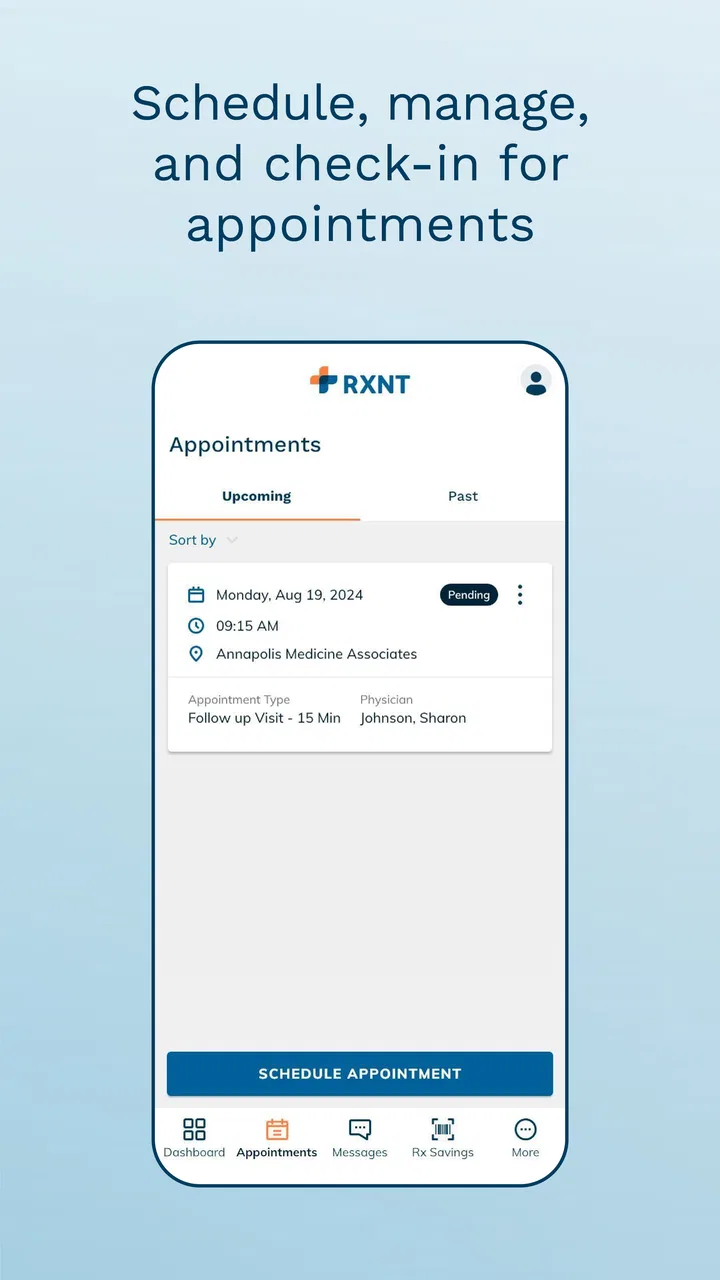
MyRXNT may offer appointment-related tools and secure communication options, but the exact functions depend on the healthcare organization using RXNT. Some practices allow patients to request or manage appointments, send messages, or receive office updates, while others may restrict these features. Check the options shown in your account or ask your provider which services are available.
04Is MyRXNT suitable for emergencies or urgent medical problems?
No. MyRXNT should not be treated as an emergency service or a replacement for immediate medical attention. The app is intended for routine healthcare access and administrative communication, and messages may not be reviewed instantly. For severe symptoms, a medical emergency, or an urgent safety concern, call your local emergency number or contact an appropriate urgent-care service immediately.
05How does MyRXNT handle privacy and personal health information?
Because MyRXNT can connect to healthcare records and provider communications, users should treat the account as sensitive. Use a strong, private password, enable device security, avoid signing in on shared phones, and log out when appropriate. Review the app’s current privacy policy and permissions before use, and remember that information availability and data practices may depend on the participating healthcare provider.
Pros
- Quick access to prescriptions
- refills
- and medication details.
- Secure messaging helps you stay connected with your healthcare provider.
- Appointment information is available in one convenient mobile app.
- Useful for managing care across participating RXNT practices.
- Clean layout makes common patient tasks easy to find.
Cons
- Features depend on your provider using the RXNT patient platform.
- Some actions may require provider approval before completion.
- Medication information may not update instantly after a prescription change.
- Occasional login or loading issues can interrupt access to records.
- Not all healthcare services or documents may be available in the app.

MyRXNT
Gallery